
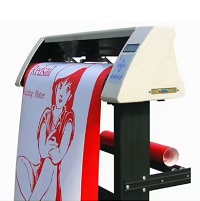
Redsail RS720C USB Driver 2.1 FTDI / CH341SER
Redsail RS720C USB Driver 2.1 FTDI / CH341SER helps connect a compatible Redsail RS720C cutting plotter to a Windows computer through USB.
Rate this app
Download and install the Redsail RS720C USB Driver 2.1 FTDI / CH341SER to connect your vinyl cutter to a Windows PC. Learn about features, compatibility, installation, troubleshooting, pros, and cons.
The Redsail RS720C USB Driver 2.1 FTDI / CH341SER is a driver package name associated with connecting a Redsail RS720C cutting plotter to a computer through a USB connection. If you use this cutter for vinyl lettering, sign making, graphics, stickers, or other cutting projects, installing the correct USB driver is an important step in establishing communication between the machine and your computer.
A cutting plotter depends on communication between its control electronics and compatible design or cutting software. When Windows cannot recognize the connected machine correctly, the software may fail to detect the cutter, the required communication port may be missing, or cutting jobs may not reach the hardware.
This is where a suitable USB-to-serial driver can help. Depending on the hardware installed in the cutter or its USB interface, the required driver may be from FTDI or the CH340/CH341 family supported by the CH341SER driver.
Important: FTDI and CH341SER are different driver families. The correct choice depends on the USB interface fitted to your particular machine. The name “2.1” alone does not establish the chipset, the driver's publisher, or its compatibility with every RS720C unit. Confirm the hardware before installing a driver.
What Is the Redsail RS720C USB Driver?
The Redsail RS720C USB driver enables compatible Windows software to communicate with the cutting plotter through its USB interface. In many USB-to-serial configurations, the driver creates a virtual COM port that applications can use to send commands to the connected machine.
For example, a cutting application may need to identify a serial port before it can send a design to the plotter. If the driver is missing or incorrectly installed, the application may not find the expected connection.
FTDI provides Virtual COM Port (VCP) drivers that allow supported FTDI USB devices to appear as serial ports in Windows. WCH, the manufacturer of CH340 and CH341 interface chips, provides the CH341SER driver for compatible devices. Both driver families perform related functions, but they are not interchangeable for every USB interface.
Key Features
1. USB Connectivity
The primary purpose of a compatible driver is to help Windows recognize the cutter's USB interface. Once the driver is correctly installed, compatible cutting software may be able to communicate with the machine through the available connection.
Successful communication also depends on the USB cable, cutter settings, software configuration, and hardware condition.
2. Virtual COM Port Support
FTDI VCP and compatible CH340/CH341 serial drivers can provide a virtual COM port for supported devices. This allows suitable software to communicate with the hardware through a serial-port interface.
The assigned port may appear as COM3, COM4, COM5, or another number. The exact number depends on your computer and its existing devices.
3. Support for Compatible Cutting Software
The driver can provide the communication layer required by cutting software that supports the RS720C and its connection method.
However, the driver does not automatically add new cutting features to an application. Software compatibility depends on whether the program supports the cutter model, command protocol, and connection settings.
4. Windows Device Recognition
Installing the correct driver can resolve situations in which Windows displays an unknown USB device or fails to provide the expected serial connection.
For supported FTDI devices, Windows may install the driver through Windows Update. WCH also provides Windows drivers for its CH340/CH341 interfaces.
5. Support for Different Computer Architectures
Driver availability depends on the selected chipset and operating system.
FTDI lists supported Windows desktop drivers for Windows 10 and Windows 11, including 32-bit and 64-bit editions where applicable. WCH lists CH341SER support for numerous Windows versions and both 32-bit and 64-bit systems.
This does not guarantee that every driver package works with every Redsail RS720C configuration.
6. Lightweight Driver Installation
USB-to-serial drivers are generally small compared with complete design applications. The driver package provides the communication component rather than a complete graphic design or cutting program.
The actual download size and installation requirements depend on the package you select.
7. Improved Troubleshooting
A correctly installed driver makes it easier to identify the communication port and determine whether Windows recognizes the USB interface.
This helps separate driver-related problems from issues involving the cutting application, connection cable, or cutter hardware.
8. Support for Existing Workflows
When the correct driver and cutting application are compatible, you may be able to continue using an established sign-making workflow without changing the way you prepare designs.
The driver itself does not create designs, convert artwork, or control every cutter function. Those tasks depend on the software and machine.
System Requirements
The following are general requirements for installing a compatible USB-to-serial driver. They are not a verified, model-specific specification sheet for every RS720C revision.
Requirement | Details |
|---|---|
Device | Redsail RS720C cutting plotter |
Computer | Compatible Windows desktop or laptop |
Operating system | Windows 11, Windows 10, or another version supported by the selected driver |
Architecture | 32-bit or 64-bit, depending on driver availability |
Connection | Working USB port and suitable USB cable |
Driver | Correct FTDI VCP or WCH CH341SER package |
Software | Cutting software compatible with the RS720C |
Storage | Enough free space to download and extract the driver |
Permissions | Administrator access may be required for installation |
Internet | Helpful for obtaining drivers and Windows updates |
Windows 11
Windows 11 may work with a compatible, appropriately signed driver, but you should not assume that every legacy RS720C driver package is supported. Check the USB chipset and the driver's documentation before installation.
Windows 10
Windows 10 supports current FTDI desktop drivers and WCH CH340/CH341 drivers for supported interfaces. The precise result still depends on the cutter's USB hardware and the cutting software.
Windows 8 and Windows 7
Older Windows versions may require driver packages designed for those systems. FTDI and WCH publish compatibility information for their respective products, but availability of a chipset driver does not guarantee full compatibility with the cutter application.
Windows 7 and Windows 8 are no longer supported by Microsoft through ordinary security servicing. If you continue using them with a cutting machine, consider the security risks.
32-bit and 64-bit Windows
Check your Windows system type before downloading a driver. Open Settings, select System, and look for the system type or device specifications. The exact menu names may vary by Windows version.
Install a driver that supports both your operating system and its architecture.
How to Identify the Correct FTDI or CH341SER Driver
Before installation, identify the USB interface used by your cutter.
Connect the Redsail RS720C to your computer with a suitable USB cable.
Open Device Manager in Windows.
Expand the sections named Ports (COM & LPT) and Universal Serial Bus controllers. Also check Other devices if the cutter is not recognized.
Look for a device entry associated with the cutter or its USB-to-serial interface.
Right-click the entry and open Properties.
Under the Details tab, select Hardware Ids from the property list.
Review the device identification information and compare it with the documentation for the suspected chipset.
A hardware ID can help distinguish an FTDI interface from a CH340/CH341 interface. If the information is unclear, check the cutter's documentation or contact Redsail or the seller with the model and hardware revision.
Do not choose a driver solely because its filename contains “RS720C,” “FTDI,” or “CH341SER.” Confirm that the package matches the connected hardware.
Previous versions
No previous versions available yet.
Comments
No comments yet. Be the first to comment.
Leave a comment
Your email address will not be published. Required fields are marked *